
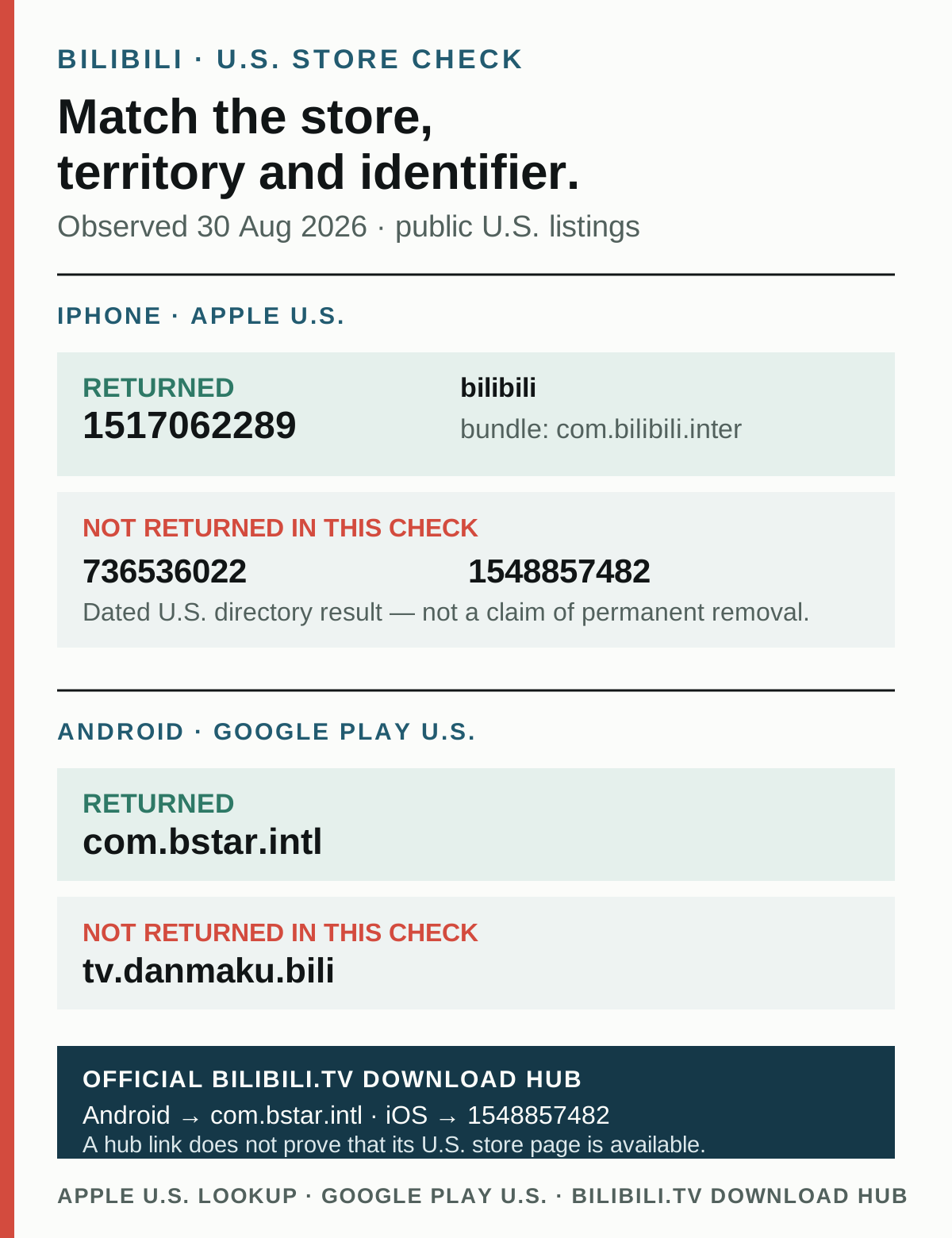
For a U.S. iPhone, the Bilibili listing we could verify on August 30, 2026 is app ID 1517062289. For U.S. Android, the verified Google Play package is com.bstar.intl. Do not use an app name or icon alone: several Bilibili-branded identifiers circulate, and the current U.S. store results do not support treating them as one interchangeable product.
Two older or differently routed identifiers did not return a U.S. listing in the same check. Apple’s U.S. lookup returned zero results for app IDs 736536022 and 1548857482, and the U.S. Google Play URL for package tv.danmaku.bili returned 404. These are dated observations, not claims that an app was permanently removed or is unavailable in every country.
Current U.S. identifier matrix
| Platform and region | Identifier | What the official check returned | What you can safely conclude |
|---|---|---|---|
| iPhone / iPad, United States | 1517062289 |
Apple U.S. lookup: 1 result; public U.S. listing: available | This is the current verified U.S. iOS route checked on August 30 |
| iPhone / iPad, United States | 736536022 |
Apple U.S. lookup: 0 results; public U.S. route: 404 | It did not return in this storefront check; do not call that permanent removal |
| iPhone / iPad, United States | 1548857482 |
Apple U.S. lookup: 0 results; public U.S. route: 404 | The official bilibili.tv hub links this ID, but the hub does not prove U.S. availability |
| Android, United States | com.bstar.intl |
U.S. Google Play listing: available | This is the current verified U.S. Android route checked on August 30 |
| Android, United States | tv.danmaku.bili |
U.S. Google Play route: 404 | It did not return in this territory check; do not generalize to other regions or future dates |
| Web | bilibili.com |
Main Bilibili website | The mainland-oriented community website is not evidence that its mobile app is in a U.S. store |
| Web | bilibili.tv |
International BiliBili website and download hub | The site and hub can open, but the official About page does not list the U.S. among its named service territories |
The verified U.S. iOS listing uses bundle ID com.bilibili.inter, names BILIBILI SINGAPORE PTE. LTD. as seller and lists English among its interface languages. The verified Android listing uses com.bstar.intl and names BALABOOM PTE. LTD. as developer. The bilibili.tv download hub points Android users to com.bstar.intl, but its iOS button points to 1548857482, not 1517062289.
That mismatch is why this page does not collapse app ID 1517062289, Android package com.bstar.intl and the bilibili.tv service into “the same app.” They share Bilibili branding and overlapping video positioning, but the checked official pages do not prove identical accounts, catalogs, subscriptions, rights, features or product ownership across all three routes.
What changed in the August 30 recheck
Earlier versions of this guide treated Apple’s U.S. metadata for 736536022 and the U.S. Google Play route for tv.danmaku.bili as current. That is no longer what the official U.S. endpoints returned on August 30:
- Apple lookup for
736536022:resultCount: 0; - Apple public U.S. page for
736536022: 404; - U.S. Google Play page for
tv.danmaku.bili: 404; - Apple lookup and public listing for
1517062289: still returned a current U.S. result; - U.S. Google Play page for
com.bstar.intl: still returned a current listing; and - the
bilibili.tvhub’s iOS link resolved to1548857482, which itself returned no U.S. result.
Store availability can change without a product announcement. We therefore record the country, identifier, response and date instead of inventing a migration story. The checked sources do not say that 736536022 moved to 1517062289, that old accounts were merged, or that either missing U.S. route is gone forever.
How to download Bilibili on a U.S. iPhone
- Open the current U.S. App Store route for ID
1517062289. - Confirm the numeric ID in the URL before installing.
- Confirm the seller is BILIBILI SINGAPORE PTE. LTD.
- On the product page, check device compatibility, privacy disclosures, in-app purchases and the current version rather than relying on a screenshot here.
- If Apple says the app is not available for your account, stop. Do not change store country casually or install a profile from an unknown site to bypass the result.
Apple’s U.S. lookup showed version 6.3.0, released August 25, 2026, when this page was checked. That version is a dated verification detail, not a promise that every reader will see the same build.
Do not use the bilibili.tv hub’s iOS button as proof that its linked ID is available in the United States. On the check date, that button targeted ID 1548857482; Apple returned no U.S. result for it.
How to download Bilibili on U.S. Android
- Open the U.S. Google Play listing for package
com.bstar.intl. - Confirm the package in the URL is exactly
com.bstar.intl. - Confirm the developer is BALABOOM PTE. LTD.
- Review the current regional catalog language, permissions, data-safety disclosure, in-app purchases and device compatibility.
- If Google Play says the app is unavailable, do not replace it with a third-party “Bilibili English APK” merely because the icon looks right.
The official bilibili.tv download hub also points Android users to com.bstar.intl. Its Google Play description emphasizes licensed anime, creator videos, short dramas and multilingual support, while the official BiliBili About page says content varies by region.
Package tv.danmaku.bili did not return a U.S. Google Play page on August 30. This page does not recommend a direct APK, a mirror or a store-region workaround for that package.
The bilibili.tv U.S. boundary
The international site’s official About page names Indonesia, the Philippines, Thailand, Vietnam, Singapore and Malaysia as its available territories outside Greater China. It also says content varies by region and can change at any time. The United States is not in that stated territory list.
This creates an important distinction:
- the website or download hub being reachable from a U.S. browser is not proof that every video, subscription or app route is licensed for the United States;
- the Android app having a U.S. Google Play listing is not proof that the entire
bilibili.tvcatalog is playable in the U.S.; and - app ID
1517062289having a U.S. Apple listing is not proof that it is the exact iOS counterpart of the hub’s1548857482link.
Check the title you actually want before paying. Visibility in search, app installation, account creation, playback rights and subscription entitlement are separate steps.
What “English” means: four different layers
| Layer | What the current sources support | What they do not support |
|---|---|---|
| App interface | Apple lists English for ID 1517062289; Google describes multilingual support for com.bstar.intl |
Every screen, experiment, help flow or purchase sheet being translated |
| Catalog metadata | Some titles and descriptions appear in English or other supported languages | Every creator title, tag, search term or image containing an English translation |
| Subtitles and audio | The current iOS listing promotes AI dubbing; the Android listing promotes multilingual viewing | English subtitles or dubbing on every video, or human-level translation accuracy |
| User content | Both product descriptions emphasize creators and live comments | Automatic English translation of danmu, comments, usernames, creator speech or text embedded in video |
After installing, let the app follow the phone’s English setting. On iPhone, check the app-specific language control if iOS shows one. On Android, check the app language control if the device and build expose it. Menus move between releases, so do not follow an old tutorial based only on icon position.
For a particular video, open its caption or audio menu. If English is absent there, the store’s “English” language label does not create it.
Which route should a U.S. reader use?
Use iOS ID 1517062289 if you want the Bilibili-branded app currently returned by Apple’s U.S. storefront. Its current description spans anime, gaming, technology, culture, creator video and danmu rather than presenting only a licensed-anime catalog.
Use Android package com.bstar.intl if you want the BiliBili app currently returned by U.S. Google Play. Its current listing leans more heavily toward licensed anime, creator videos and short dramas.
Use bilibili.com in a browser when you want to inspect the main China community and can work with Chinese-language navigation or search terms. Do not infer from the website that its corresponding main mobile package is currently distributed in the U.S.
Treat bilibili.tv as a separate international service context whose own official page names specific Asian territories and region-varying content. Test playback and checkout in the United States before assuming a subscription is usable.
Account and payment limits
The checked official sources do not establish account, history, purchase or membership portability among the identifiers on this page. Do not assume that logging into one product will recover a profile or purchase from another.
Before paying:
- record the exact app ID or package and seller;
- verify that the specific title plays in the United States;
- read the renewal price and cancellation terms shown by Apple or Google;
- confirm which product receives the membership; and
- proceed only if the checkout itself explains the benefit you are buying.
Do not buy an account, rent an SMS number or submit someone else’s identity to work around a region or verification check. A successful login does not prove that the account is recoverable or that a later risk check will pass.
Questions readers ask next
Is Bilibili available in the USA?
Yes, in the limited storefront sense verified here: Apple returned U.S. app ID 1517062289, and U.S. Google Play returned package com.bstar.intl on August 30, 2026. Availability of a particular video, account feature or subscription remains separate.
Which Bilibili app should I download on iPhone in the U.S.?
Use Apple app ID 1517062289, then confirm the seller is BILIBILI SINGAPORE PTE. LTD. IDs 736536022 and 1548857482 did not return U.S. listings in the same check.
Which Bilibili app should I download on Android in the U.S.?
Use Google Play package com.bstar.intl, then confirm the developer is BALABOOM PTE. LTD. Package tv.danmaku.bili returned 404 in the U.S. check.
Why does the official BiliBili download page link a different iPhone app?
The bilibili.tv hub currently links iOS ID 1548857482, while the Apple app we could verify in the U.S. is ID 1517062289. The official pages checked here do not explain that mismatch, so this guide records it instead of guessing that one migrated to the other.
Is ID 736536022 permanently unavailable in the United States?
Unknown. Apple’s U.S. lookup returned zero results and its public U.S. page returned 404 on August 30. That supports only a dated storefront observation, not a permanent-delisting claim.
Does the U.S. Bilibili app have English subtitles?
Some videos may offer English captions or AI dubbing, and the verified apps advertise multilingual features. Coverage is video-specific. Interface English, English metadata, subtitles, audio and translated comments are not the same thing.
Daily verification note
This page is temporarily on a daily store check because official U.S. results changed and the international download hub points to an iOS identifier that did not resolve in the U.S. storefront. Each check should record:
- Apple U.S.
resultCountand public-page status for IDs1517062289,736536022and1548857482; - U.S. Google Play status for
com.bstar.intlandtv.danmaku.bili; - any change to the iOS and Android targets on
bilibili.tv/en/download; and - any official statement explaining a product rename, migration, regional change or account relationship.
No change should be inferred from an icon, search snippet or third-party APK page.
Sources and scope
- Apple U.S. lookup for app ID 1517062289 — current U.S. result, app ID, bundle, seller, version and language metadata.
- Apple U.S. lookup for app ID 736536022 — zero-result U.S. check; not evidence of permanent withdrawal.
- Apple U.S. lookup for app ID 1548857482 — zero-result U.S. check for the identifier linked by the official international hub.
- U.S. Google Play listing for package com.bstar.intl — current package, developer and product presentation.
- U.S. Google Play check for package tv.danmaku.bili — 404 in the dated U.S. check; not evidence of global or permanent unavailability.
- BiliBili international download hub — current iOS and Android link targets; a hub link does not establish U.S. store availability.
- BiliBili international About page — official service-territory list, product description and region-varying catalog boundary.
Storefronts and official pages were checked on August 30, 2026. This page reports the United States endpoints and identifiers observed on that date. It does not assert a permanent delisting, a product migration, shared accounts, shared purchases or full catalog availability.