
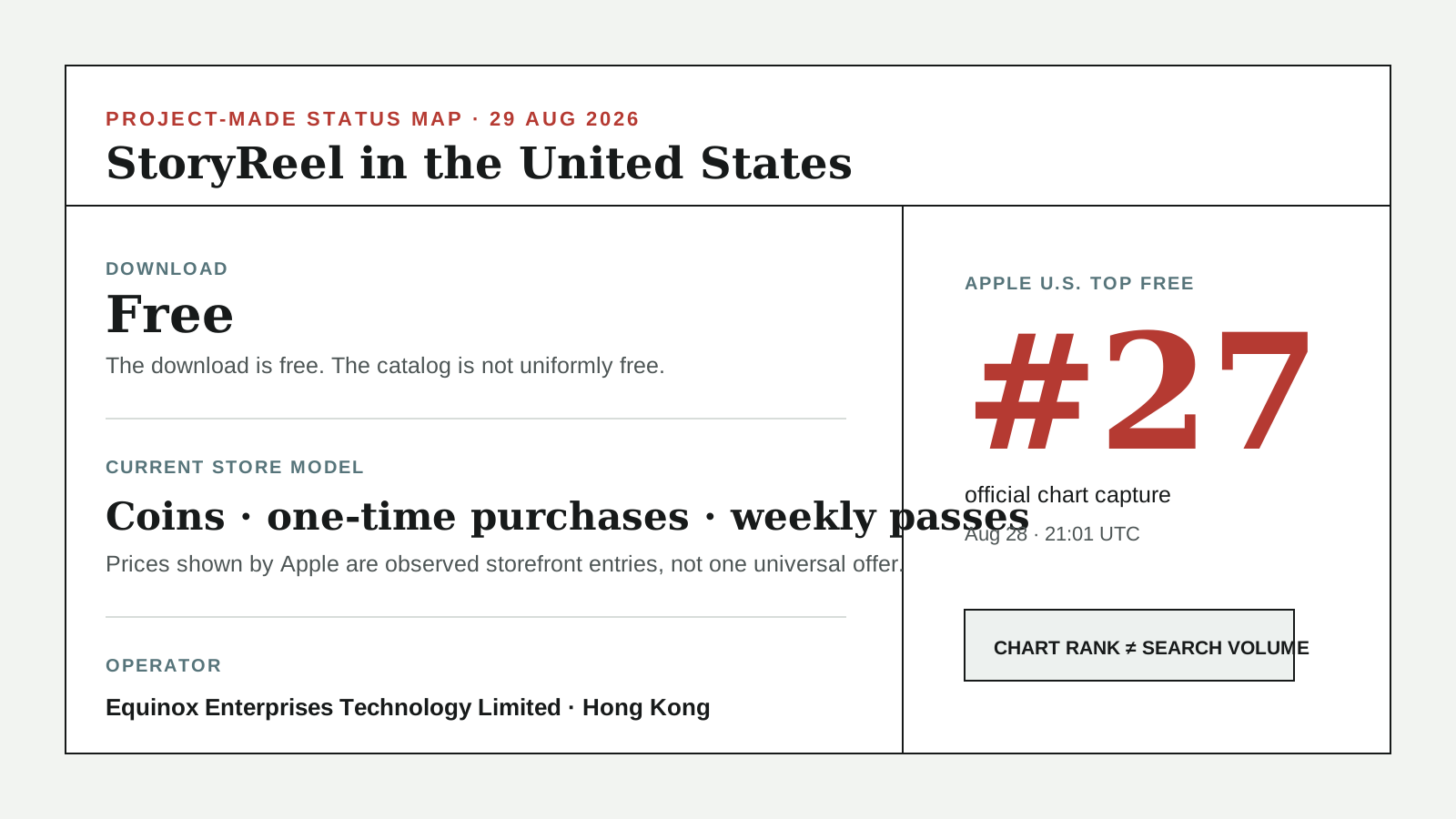
StoryReel is free to download, but it is not an all-free streaming service. Its current U.S. App Store listing shows in-app purchases, one-time purchase entries and several Weekly Pass Pro entries. The exact offer shown to you can vary by account, platform, promotion and date, so the checkout screen—not an old screenshot—is the price that matters.
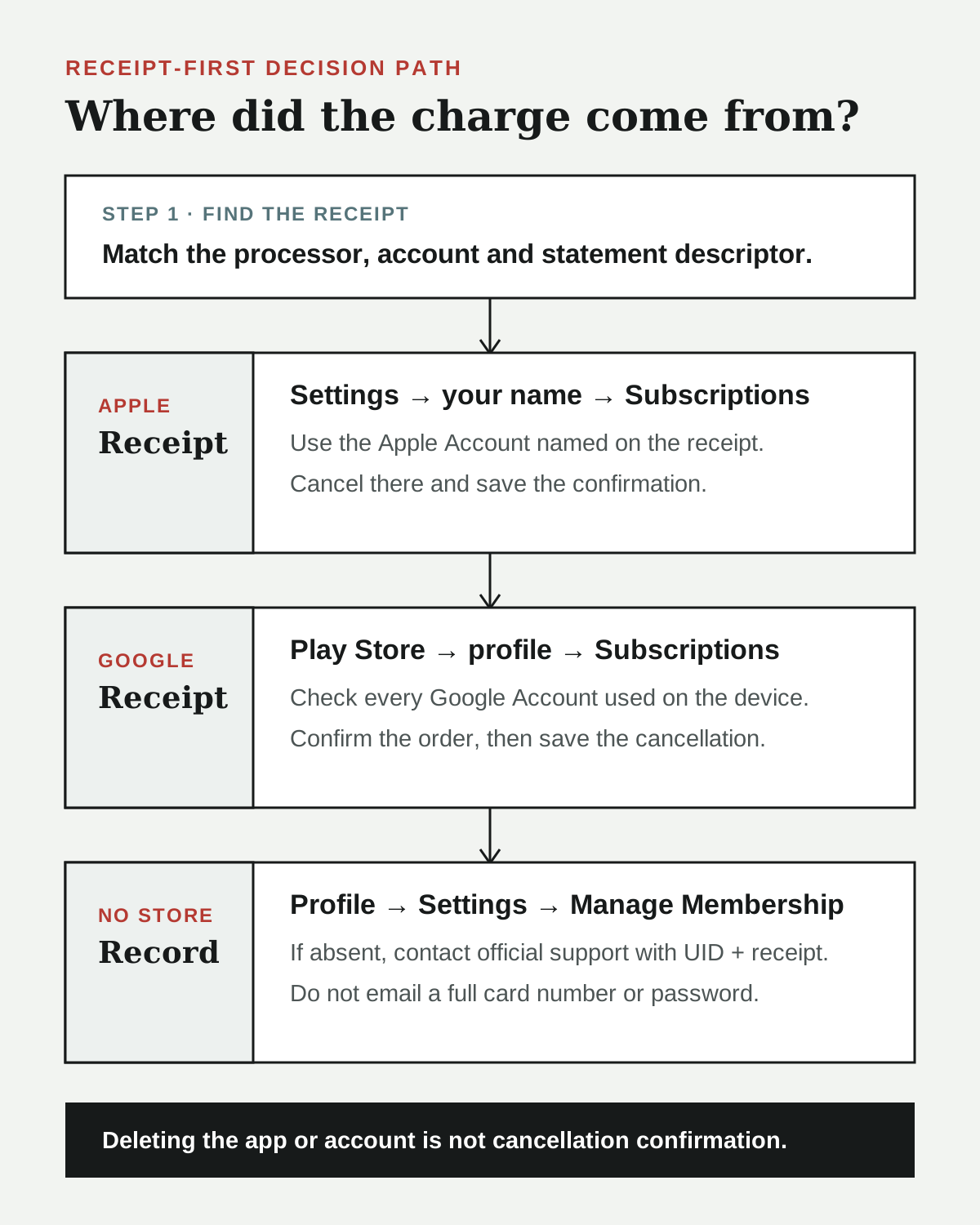
To cancel, first identify who processed the payment. An Apple receipt belongs in Apple Subscriptions. A Google Play receipt belongs in Google Play Subscriptions. If neither store shows the plan, use StoryReel’s current Profile → Settings → Manage Membership route and its official support address. Deleting the app or account is not proof that recurring billing ended.
How much does StoryReel cost?
Apple’s U.S. storefront currently lists the app as Free · In-App Purchases. The visible purchase entries include:
| Store entry observed August 29 | Price shown | What it establishes |
|---|---|---|
| Weekly Pass Pro | $9.99 or $19.99 variants | recurring weekly offers exist, but the listing does not explain why each variant differs |
| One-time Purchase | $3.49, $19.99 or $24.99 | one-time purchase entries exist, but the public listing does not map each one to a fixed coin amount or complete series |
Do not read this table as a menu guaranteed to appear in every account. Apple exposes multiple entries with the same Weekly Pass Pro name at different prices. The public record does not say whether the difference comes from benefits, tests, promotions or another condition. Read the live checkout sheet for the amount, billing period, renewal and included benefits before confirming.
Google Play labels the app as containing ads and in-app purchases. Its United States-facing listing does not provide a simple public price table. That means an iPhone price should not be copied into an Android answer.
The safest way to estimate the cost of one title is to keep three units separate:
- Count the locked episodes that remain.
- Check the coin price on more than one locked episode.
- Compare the total coins required with the bundles or pass benefits shown in your account.
- Include unused coins and the next automatic renewal in the comparison.
- Confirm whether “unlimited” applies to the whole catalog, selected titles or only a stated benefit period.
This page does not claim that a pass unlocks every story. The reviewed public store records do not establish that.
How to cancel a StoryReel subscription
Use the receipt-first route. The device on which you watch is less important than the company that processed the payment.
If Apple processed the payment
Open Settings → your name → Subscriptions → StoryReel, then use the cancellation control shown there. If StoryReel is missing, Apple says to find the receipt and check the Apple Account that made the purchase. A receipt from another company means Apple may not manage that subscription.
StoryReel’s current U.S. iPhone listing states that subscriptions offered there are processed through the App Store. That statement applies to the Apple purchase route; it does not prove that every StoryReel charge on every platform goes through Apple.
If Google Play processed the payment
Open Google Play → profile → Payments & subscriptions → Subscriptions. Check every Google Account used on the device. Google recommends checking the purchase email and Google Wallet when a subscription is missing.
If Google Play shows the plan, cancel it there and save the confirmation. Uninstalling the app does not cancel a Google Play subscription.
If neither Apple nor Google shows the subscription
First, do not buy another pass to test the account. StoryReel’s current developer responses in the App Store direct users to Profile → Settings → Manage Membership. The official Google Play listing gives service@storyreel.life as customer support.
Send only the minimum information needed to locate the transaction:
- StoryReel user ID;
- registered email address;
- transaction date and amount;
- receipt or transaction identifier;
- a screenshot showing the missing membership or cancellation control.
Do not email a full card number, password, one-time code or identity document. Ask for written confirmation that automatic renewal has ended. If the merchant cannot locate a continuing charge, contact the card issuer using the issuer’s dispute and recurring-payment process; a bank action is not the same as receiving a refund from StoryReel.
Why a StoryReel subscription may not show up
A missing listing does not have one universal cause. Current public complaints and a Google Play Community thread document the same user task, but they are anecdotal reports—not proof that every StoryReel payment bypasses an app store.
Check these possibilities in order:
| What you found | Next check |
|---|---|
| Apple receipt | the exact Apple Account named on it |
| Google Play receipt | every Google Account on the device, plus Wallet |
| StoryReel or another merchant descriptor | the app’s Manage Membership screen and official support |
| no receipt, only a card charge | search all email accounts by date and amount, then ask the issuer for the full descriptor |
| canceled but still has access | confirm the renewal date; access can remain until the paid period ends |
| canceled but charged again | preserve the cancellation confirmation and compare its timestamp with the new charge |
Do not infer that a plan is canceled because the app was deleted, the account was removed or the content stopped working. A cancellation confirmation is the useful record.
Cancellation and refund are different
Cancellation stops a future renewal under the applicable terms. A refund asks for a past charge to be reversed. One does not automatically produce the other.
For an Apple transaction, follow Apple’s purchase and refund route. For a Google Play transaction, use the Google account and order record. For a charge processed by StoryReel or another merchant, contact the operator with the receipt and account ID. This guide cannot determine whether a particular charge is refundable and does not promise an outcome.
Is StoryReel Chinese?
StoryReel is operated by Equinox Enterprises Technology Limited. Its current terms identify the company as a legal entity registered in Hong Kong, and the Google Play developer record gives a North Point, Hong Kong address.
That establishes the platform’s operator connection. It does not establish that every StoryReel title is a mainland Chinese production, uses Chinese actors or was filmed in China. A platform can distribute localized English vertical drama, licensed work and productions from more than one country. Verify a title’s credits separately.
For the wider format and platform map, see where to watch Chinese short dramas in the United States. For the same receipt-first method applied to another major app, see our ReelShort ownership, cost and coins guide.
Why this app is showing up now
StoryReel is currently #27 in Apple’s official United States Top Free Apps feed, captured August 28 at 21:01 UTC. An independent public snapshot using August 25 data placed it at #41 among free apps overall and #6 in Entertainment.
The difference is a useful directional sign, not a precise measured rise: the two observations come from different publishers and capture methods. App-chart rank also is not Google search volume. It explains why this page was reviewed now; it does not guarantee traffic or continued growth.
Questions readers ask next
Is StoryReel completely free?
No. It is free to download and may offer free access paths, but both major store listings disclose in-app purchases, and Apple’s current U.S. listing shows recurring Weekly Pass Pro entries.
What is the StoryReel subscription price?
Apple currently displays Weekly Pass Pro variants at $9.99 and $19.99. Confirm the exact price, period and benefits in your live checkout screen. The public listing does not prove that every account sees the same offer.
Why is StoryReel not in my Google Play subscriptions?
Check the receipt first. It may be under another Google Account or may have been processed outside Google Play. If there is no Google order record, check StoryReel’s Manage Membership screen and contact the official support address with your user ID and receipt.
Does deleting StoryReel cancel it?
No cancellation should be assumed from deleting the app or account. Use the payment processor’s cancellation control and save the confirmation.
Can I cancel StoryReel online?
Use the account or store that processed the charge. Apple and Google provide their own subscription managers. When neither store owns the payment, StoryReel currently points users to Manage Membership in the app and its support email; this review did not verify a separate public web billing dashboard.
Sources and scope
- StoryReel in the U.S. App Store and Apple lookup record — current U.S. identity, seller, version, rating count, free-download label, subscription wording and visible purchase entries.
- StoryReel on Google Play — current Android package, developer, ads and in-app-purchase labels, public support route and Hong Kong contact record.
- StoryReel Terms of Service — official service operator and Hong Kong registration statement.
- Apple U.S. Top Free Apps feed — official current #27 chart observation; a chart position is not search volume.
- IdeaWave StoryReel snapshot — public August 25 #41 all-category and #6 Entertainment snapshot; used only as a cross-source directional comparison, not measured installs or revenue.
- Apple subscription support and Google Play missing-subscription support — official cancellation, receipt and alternate-account checks.
- Google Play Community: StoryReel subscription not found — a dated user-reported failure mode; not treated as a verified diagnosis or prevalence estimate.
Checked August 29, 2026. China This Way did not purchase a StoryReel plan, inspect a private account or test cancellation. Store prices, chart positions, app screens and payment routes can change. This page distinguishes current public records, user-reported failure modes and unanswered account-specific facts; it does not endorse the app, promise a refund or label a disputed charge as fraud.